Access Policy allows administrators to define a single unified policy that encompasses multiple access controls with conditions and actions within the organization. The unified access policy can be used to implement following security and IT use cases:
- Secure Access to Applications
- Secure Access to Secrets
- User Authentication
- Threat Protection
- SSL Inspection & Data Loss Prevention
- DNS Filtering
- URL Filtering
- Inline CASB
Policy Model
The access policy is composed of multiple types of Controls, including reading secrets, writing secrets, updating secret permissions, accessing applications, user authentication, Secure Web Gateway, DNS Filtering, etc. Each control is composed of a Default Action and multiple Condition and Action pairs. By consolidating these controls within a single policy, administrators can effectively manage and enforce access rules across the infrastructure and network.
Default Action and Condition Block
The default action determines the action to be taken when an event, such as application access, occurs and no conditions in the control are satisfied. It can be set to either deny or allow access with arguments.
Additionally, administrators can define multiple condition blocks that, when satisfied, will trigger the associated action. The logical relationship between the condition blocks is OR. The default action and conditional action can be associated with arguments. For example, in the case of user authentication, when the action is to allow, the admin can annotate with the argument of session duration and if MFA is needed. Condition block can be created as named conditions, allowing you to reference the condition in multiple policy controls, or as inline conditions for single-use. Different types of Controls can be composed by different types of condition blocks.
Triggering and Evaluating Policies
Access Policies are triggered when users belonging to specific groups attempt to perform access actions. The policies are then evaluated based on the defined conditions and actions specified within the policy. This ensures that access to resources, such as applications and network resources, is regulated according to the established policy rules. By centralizing the policy management, administrators can maintain consistent access controls and ensure adherence to security protocols.
Access Controls
Within Access Policy, admins can fill it in with controls into the policy. Each control shown in the screenshot can be used to implement one or more of the use cases discussed above.
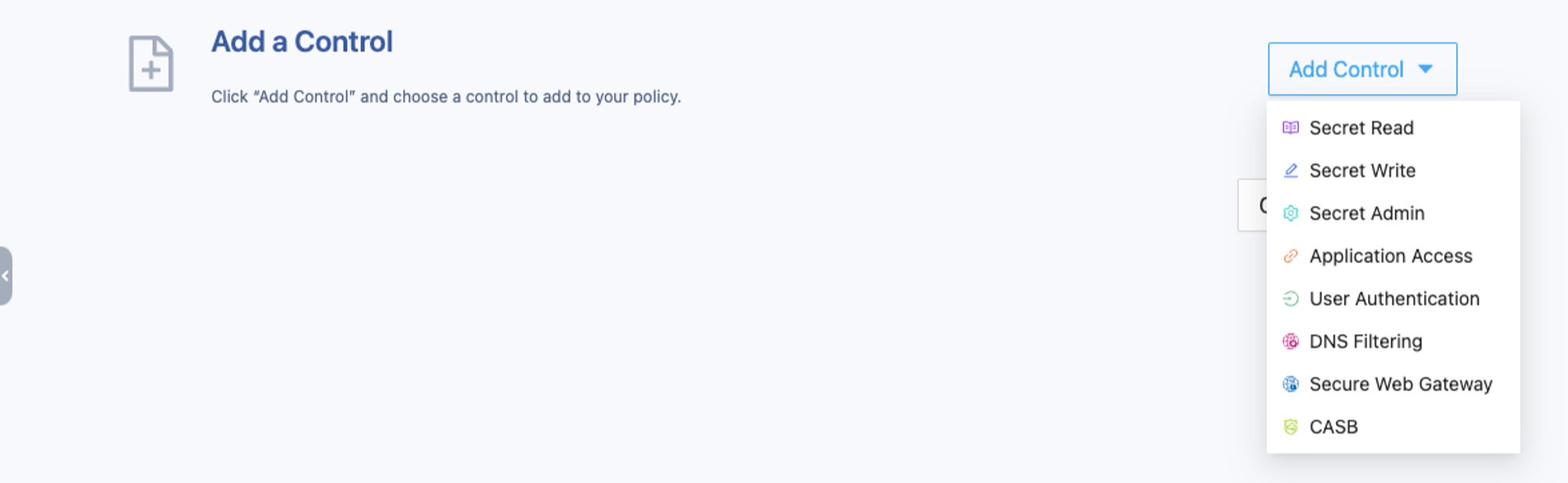
Secret Read / Secret Write / Secret Admin
When accessing secrets stored in the SSW Secret Manager from the SSW web portal, desktop client, mobile client, or browser extension, for example, by reading, writing, or changing the secret permission settings, SSW will validate the access for the Secret Read, Secret Write, and Secret Admin controls accordingly.
The actions specified in the default action and condition action can be Allow or Deny. When Allow is specified, the MFA action attribute can be specified, which means when the user is validated with an MFA prompt, they can access the resource.
Different access controls can specify different sets of conditions in condition block. The Authentication & Authorization Conditions can be specified within the following controls:
- Secret Read, Write, and Admin
- Application Access
- User Authentication
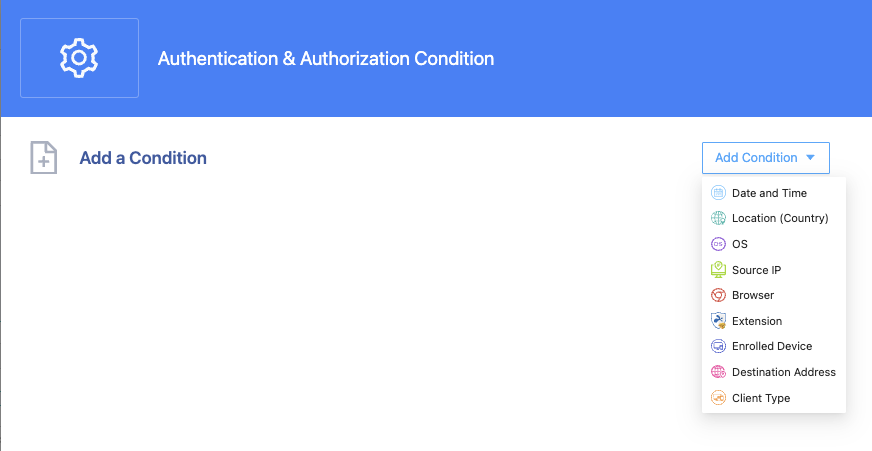
Application Access
When users access the applications provisioned in the SSW, these applications include private applications running within the private network and public applications, such as web applications or SaaS running on the internet.
The actions specified in the default action and condition action can be Allow or Deny. When Allow is specified, the MFA action attribute can be specified, which means when accessing this application, SSW will prompt for MFA if the user has not completed MFA under this condition.
The set of conditions specified for application access is Authentication & Authorization Conditions, the same as for Secret Access.
User Authentication
SSW offers extra conditional access validations along with user authentication.
The actions specified in the default action and condition action can be Allow or Deny. When Allow is specified, the MFA (which controls conditional MFA) and Session Duration (which controls the application session) action attributes can be specified.
The set of conditions specified for user authentication is Authentication & Authorization Conditions, the same as for Secret Access and Application Access.
DNS Filtering
DNS filtering is one method to implement secure internet access, especially for remote work environments. SSW endpoint software acts as a DNS proxy that can be used to enforce corporate DNS Filtering control.
The DNS Conditions can be specified within the DNS control. Partial condition options such as “Date and Time,” Location, OS, and Source IP are the same as Authentication & Authorization Conditions. Two conditions are specifically for DNS Filtering: with Domain condition, administrators can implement domain name blacklists or whitelists; with Content Categories condition, the allow or deny actions can be based on specified web categories.
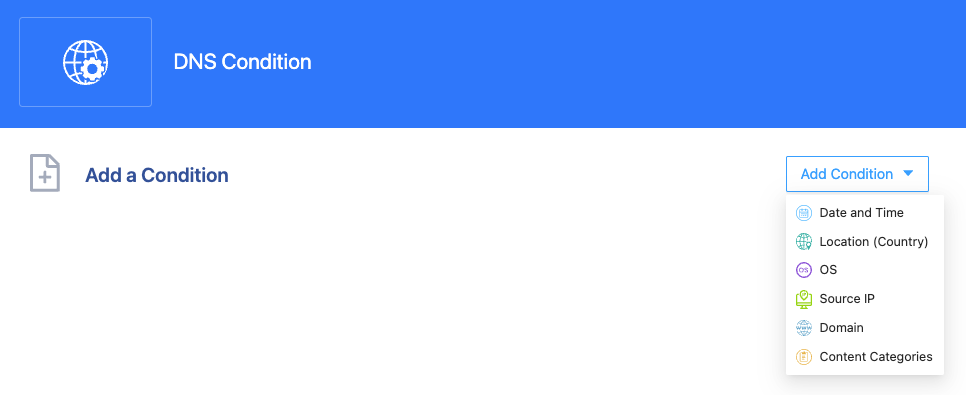
The actions specified in the default action and condition action can be Allow or Deny. When Allow is specified, the Log Event action attribute can be specified to track the user’s internet access.
Secure Web Gateway (SWG)
Secure Web Gateway (SWG) is the primary method to implement secure internet access for remote or hybrid work. The SWG control in SSW policy enforces corporate secure internet policies for all users, regardless of location. Legacy SWG architecture funnels all user traffic through the data center, leading to issues with reliability, performance, and privacy. SSW next-generation SWG operates as an endpoint agent. This architectural approach enhances the end-user experience in several key ways:
- Eliminates network disruptions caused by data center SWG outages, ensuring reliable internet access.
- Removes unnecessary traffic detours, resulting in a performance boost.
- Avoids SSL decryption on remote SWGs, reducing the risk of data leaks. Your unencrypted data remains on your device.
The SWG Conditions can be specified within the SWG control. Condition options such as “Date and Time,” Location, OS, and Source IP are the same as Authentication & Authorization Conditions. The HTTP Traffic condition is used to evaluate all HTTP and HTTPS traffic between the SSW endpoint and the internet. In the case of HTTPS traffic, SSW can perform SSL inspection by adding the SSW CA into the endpoint’s trusted CAs.
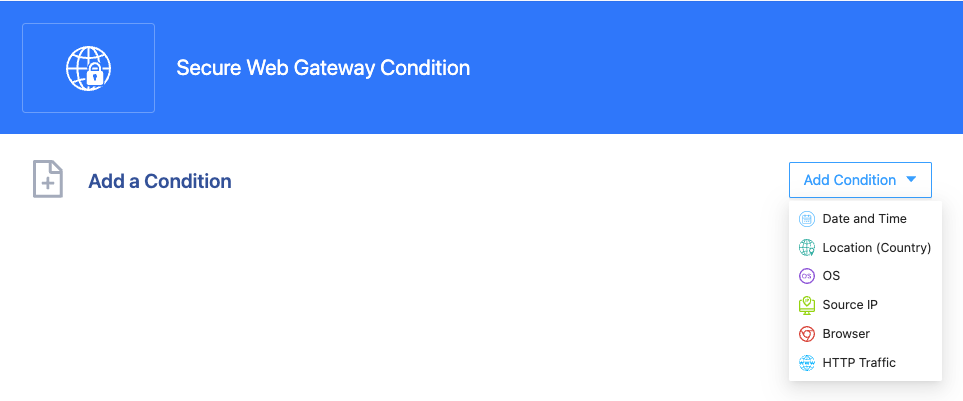
The actions specified in the default action and condition action can be Allow or Deny. When Allow is specified, the Log Event action attribute can be specified to track the user’s internet access.
The SWG control can be used to implement the following use cases:
- Threat Protection: By adding “Threat Protection” configuration into the SWG control in an SSW policy, SSW enables threat protection by blocking the upload and download of risky files containing viruses, malware, spyware, and adware.
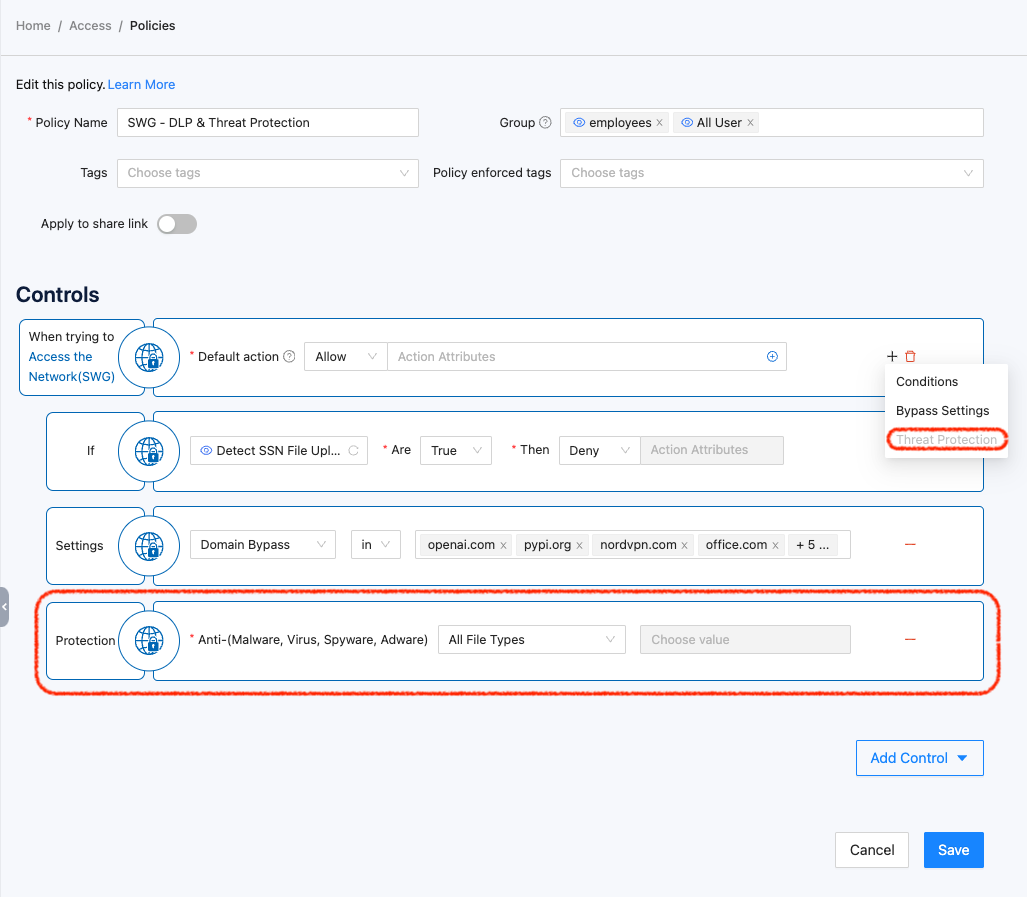
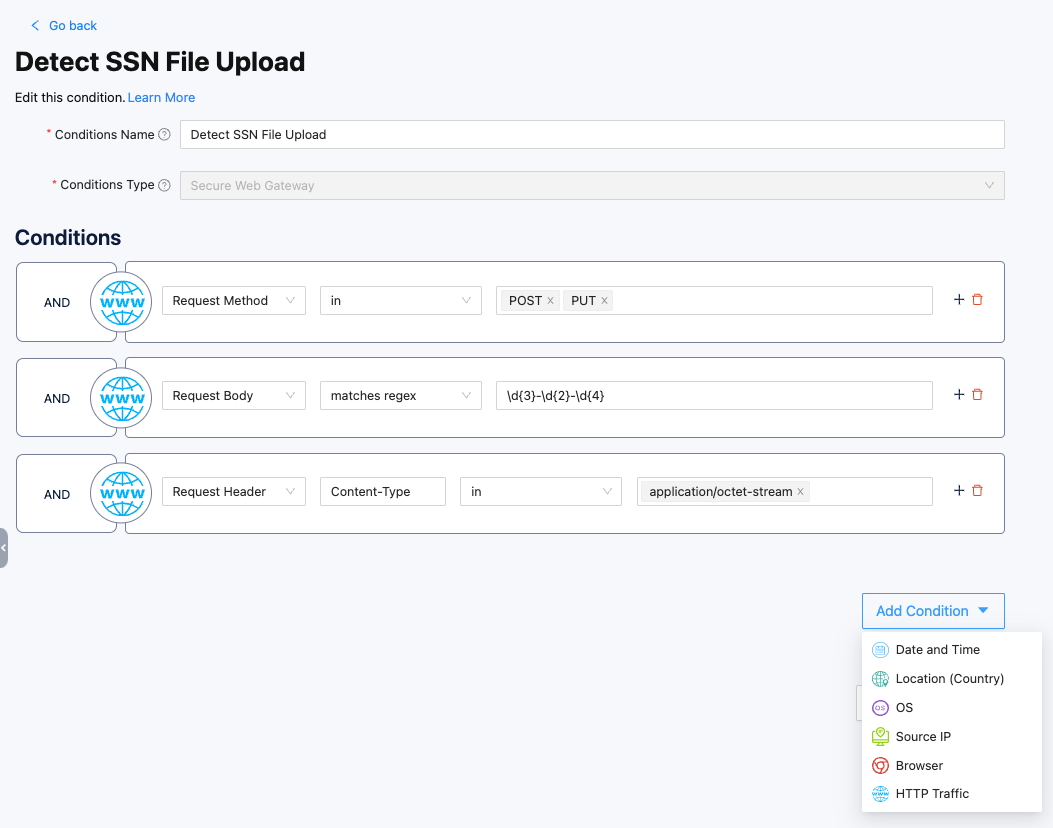
- SSL Inspection & Data Loss Prevention: By adding HTTP conditions, all web traffic (http/https) will be scanned and evaluated by SWG. The following example demonstrates a simple implementation of SSL inspection and DLP, which scans web traffic for any file uploads containing Social Security Numbers.
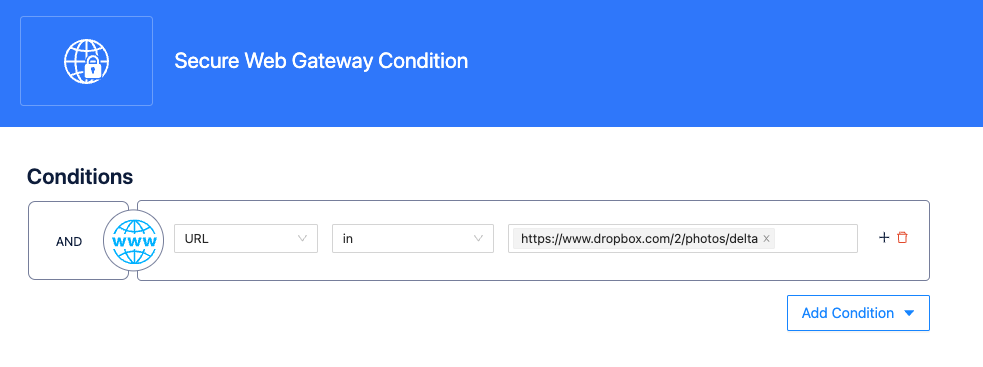
- URL Filtering: With SSW SWG, you can implement URL filtering to blacklist or whitelist sets of web URLs. The following example demonstrates blocking a user from accessing a photo in Dropbox.
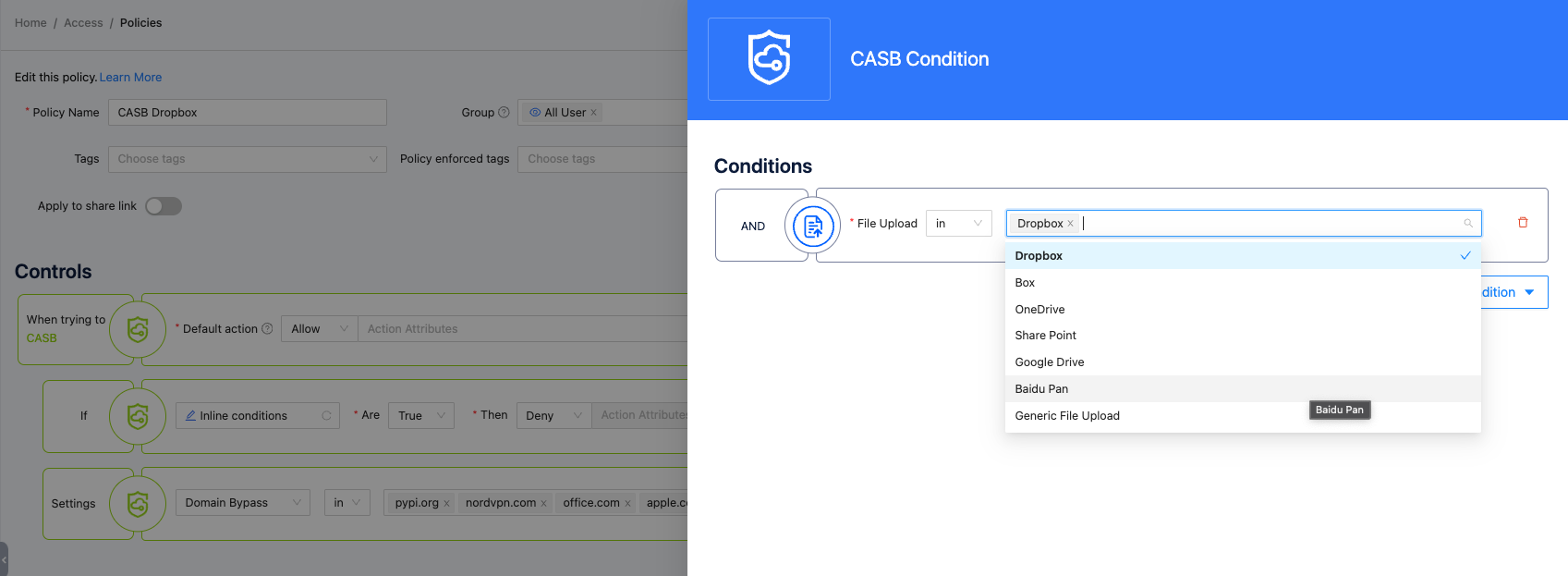
- Inline CASB: By leveraging the HTTP traffic condition, you can also implement Cloud Access Security Broker (CASB). For example, only allow users in the IT group to access a SaaS dashboard. SSW also provides a simple built-in CASB Control, which can be used to block file uploads to certain well-known cloud storage from company-issued devices to prevent leaking sensitive information.
In conclusion, Unified Access Policy in Splashtop Secure Workspace offers a powerful and flexible approach to access control and policy enforcement. Administrators can compose comprehensive policies that cover multiple aspects of infrastructure and network access, ensuring a unified and consistent security posture.