Splashtop Secure Workspace offers a flexible new capability called Support Link, which allows IT administrators to delegate application sharing rights to regular users. This feature streamlines internal collaboration and support, while maintaining strong access controls and security.
How it Works
Support Link is designed for Private and RBI applications. Once enabled by the administrator, designated users or groups will be able to generate and share temporary access links for an application — without needing elevated permissions.
This makes it easy for users to share access for troubleshooting or collaboration, without compromising credentials or overall application security.
Flexible Access Control
Admins retain full control over how Support Link is used. For each application, you can:
- Toggle on the Support Link feature
- Define which users or groups are allowed to create support links
- (Optional) Specify which credentials (secrets) can be used with the link
- (Optional) Add a passphrase to the link for added security
- (Optional) Admins can now enable support link visibility and monitoring for specific user groups, making it easier to collaborate and track link usage.
Only the creator can modify a Support Link. If you wish to overwrite the existing data, please click the Reset button.
Seamless Experience for Users
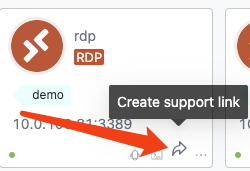
Once permissions are granted, users can generate a Support Link using the intuitive UI. The button appears as shown below:
Option 1: Card View
Option 2: List View

By clicking this icon, users can generate a link with the specified credentials and share it securely with others. The recipient will use the provided passphrase (if any) to access the application with the assigned credentials.
Summary
Support Link empowers IT administrators to extend limited sharing capabilities to regular users, enhancing agility in support and collaboration scenarios. With clear controls and security measures in place, it offers a practical and safe way to grant temporary access to critical applications.